Features

18 features. One switch each.

Every feature below shows where it appears in the cart, how to set it up and what it does for your store. Turn on only the ones you need.

Included on every plan

A cart that looks like it belongs to your store

Loto Cart replaces your theme's cart with a slide-out drawer, and the appearance editor matches it to your brand in a few minutes. No code.

Slide-out cart drawer

Opens on every add-to-cart, on every page, in the font you pick in your theme editor. Theme updates can't break it.

Appearance editor

Colors, sizes, corners, buttons, totals and the cart icon, with a live preview right next to them. What you see is what shoppers get.

Loto Cart · Appearance
Theme iconCustom
Live preview
Your cart · 2

You're $38.00 away from free shipping

Linen Overshirt
Sage · M
Canvas Tote
Natural
Checkout · $62.00
Order value

Give every shopper a reason to add one more

Goals, gifts and offers placed right where shoppers decide.

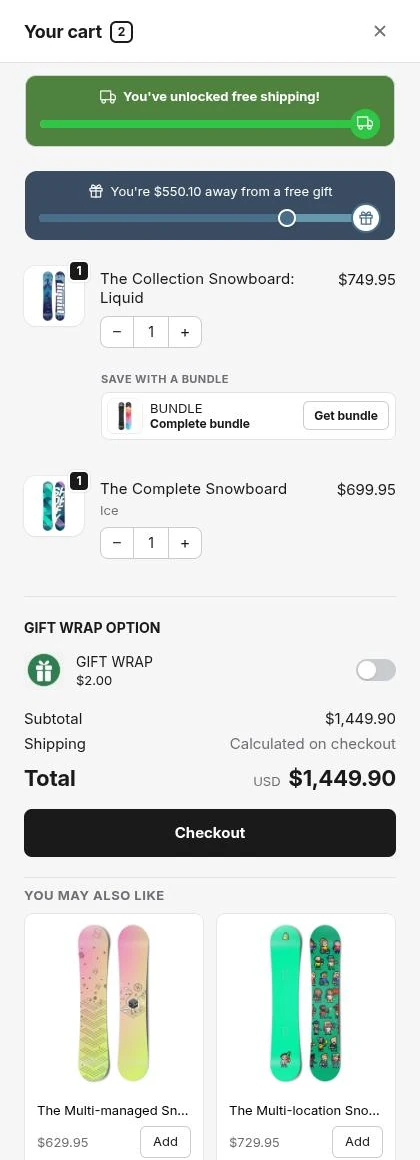
Loto Cart drawer with a free shipping bar, a free gift bar, a bundle offer under a cart item, a gift wrap add-on and a You may also like row 1 2 3 4 5
1

Free shipping bar

Free

A progress bar at the top of the cart that shows how close the shopper is to free shipping.

How to use

Set a spend or item-count goal, or import it from your existing free shipping discounts and rates.

Why it helps

Shoppers add one more item to reach the goal instead of paying for delivery.
2

Free gift

Basic

A free product that's added to the cart automatically once the order passes a spend threshold.

How to use

Pick the gift and the amount that unlocks it. If the cart drops below that amount, the gift is removed again.

Why it helps

A real reward gives shoppers a reason to spend a little more, and nobody gets it without earning it.

3

Bundles

Pro

When a cart item is part of one of your bundles, the bundle offer appears right under it.

How to use

Choose which bundles to suggest. The products in each one are detected automatically.

Why it helps

Shoppers upgrade to the full set while they're already buying part of it.

4

Cart add-ons

Basic

Optional extras like gift wrap or shipping protection, shown as one-tap switches in the cart.

How to use

Pick the products to offer. Each one is a real product, so it lands in the order like any other line.

Why it helps

Small, high-margin extras that shoppers rarely notice on a product page.

5

Upsell footer

Pro

A "You may also like" row at the bottom of the drawer.

How to use

Pick a collection to fill it. Items already in the cart can be hidden, and optional search and filters turn it into a mini shop.

Why it helps

Recommendations shoppers can add in one tap without leaving the cart.

Discounts

Make every promotion visible in the cart

Your real Shopify discounts, shown and applied before checkout.

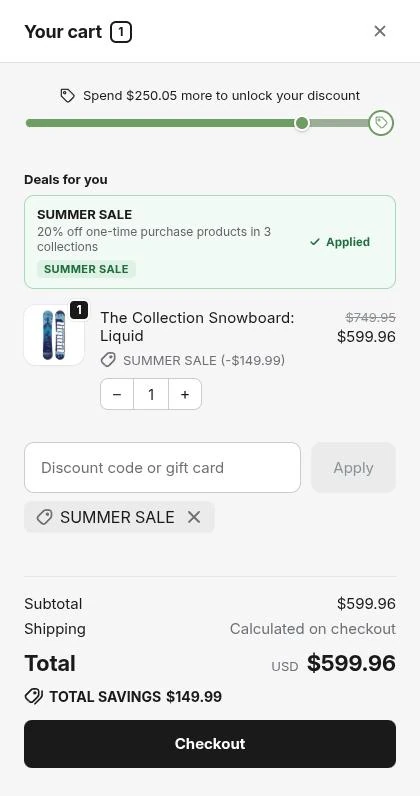
Loto Cart drawer opened from a discount link: a discount progress bar, an applied Summer Sale deal, the discount code field and the applied code chip
1 2 3 4
1

Discount URLs

Basic

Links like yourstore.com/?discount=CODE that apply the code automatically when the shopper lands.

How to use

Switch it on, then share the link in emails, social posts or influencer campaigns.

Why it helps

Nobody has to copy a code, and the saving already shows in the cart.

2

Active deals

Basic

Your store's running promotions, listed inside the cart.

How to use

Turn it on. Deals come from your real Shopify discounts, and shoppers apply one with a tap.

Why it helps

Shoppers never miss a deal they qualify for, or leave to search for a code.

3

Discount progress bar

Basic

A progress bar toward a spend goal that unlocks money off.

How to use

Import the goal and code from an existing Shopify discount. It applies itself when the goal is reached.

Why it helps

A promotion becomes a visible target, so shoppers keep adding until they hit it.

4

Discount code field

Basic

A code box in the drawer with an Apply button and a chip for each applied code.

How to use

Switch it on. Codes are checked against your Shopify discounts, with a clear message when one is invalid or expired.

Why it helps

Shoppers see their saving before checkout, so there's no last-minute surprise.

Every page

The cart, always one tap away

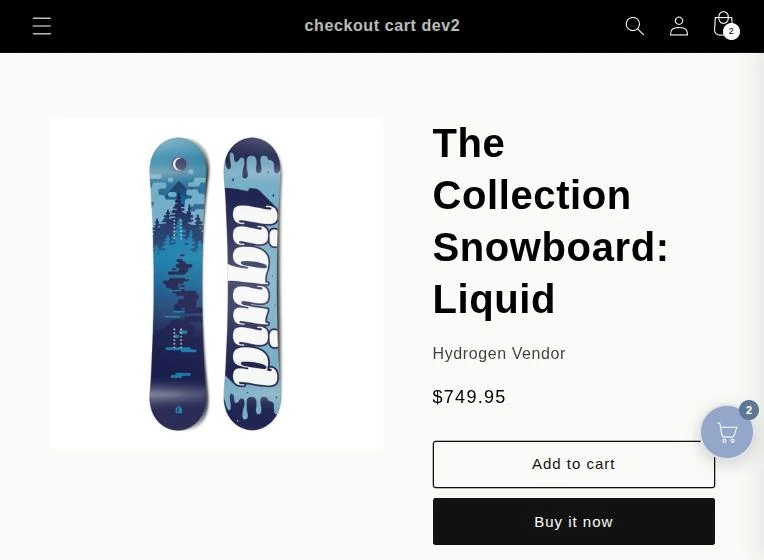
A floating button keeps the cart within reach while shoppers browse.

Product page of a Shopify store with the Loto Cart floating cart button showing 2 items

Floating cart button

Basic

A cart bubble that stays on screen on every page, with a live item count.

How to use

Pick the corner, the shape and the colors.

Why it helps

On mobile especially, the cart is always one thumb-tap away.

Cart tools

Small details that keep the cart moving

Shortcuts, urgency and quick fixes, all inside the drawer.

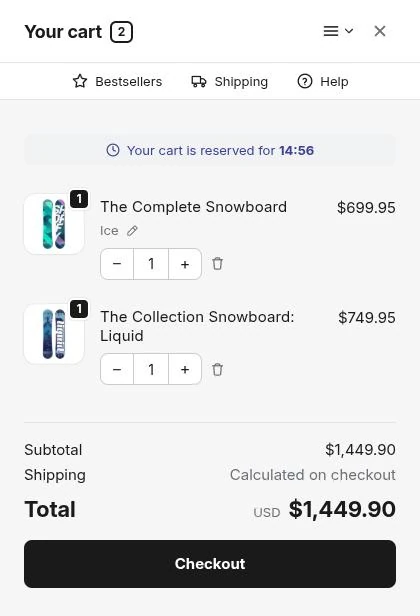
Loto Cart drawer with a More menu and Bestsellers, Shipping and Help buttons in the header, a cart reserved countdown, and edit and remove controls on each item 1 2 3
1

Header navigation

Basic

Your own quick links in the drawer header: a "More" menu plus a row of buttons under the title.

How to use

Add links to bestsellers, new arrivals, support or any page on your store.

Why it helps

The cart sends shoppers back to browsing instead of being a dead end.

2

Cart expiry

Basic

A countdown that holds the cart for a limited time.

How to use

Set the duration. A warning appears when time runs low, and idle carts expire at zero.

Why it helps

Real urgency nudges shoppers to check out now rather than later.

3

Advanced line items

Pro

Cart lines where shoppers change size, color or other options, or remove an item, right in the drawer.

How to use

Choose which per-item actions appear.

Why it helps

A wrong size gets fixed with one tap instead of ending the order.

Before checkout

Answer the last questions before they're asked

Shipping cost, special requests and payment options, all settled in the cart.

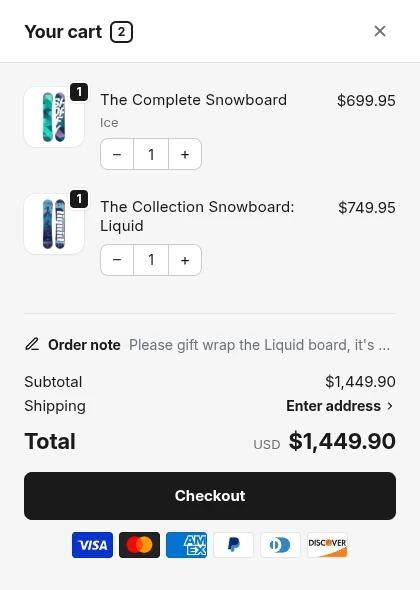
Loto Cart drawer with an order note, a Shipping Enter address link and payment icons under the checkout button 1 2 3
1

Shipping estimates

Basic

A delivery form in the drawer that answers "how much is shipping?" before checkout.

How to use

Switch it on. Shoppers enter where they're shipping to, and the details pre-fill checkout.

Why it helps

It removes the most common last-step surprise, and shoppers have one less form to fill in.

2

Cart note

Free

A note box for delivery instructions or gift messages.

How to use

Turn it on. The note is saved as the order's Shopify cart note.

Why it helps

Notes arrive with the order in your admin, so there's nothing extra to check.

3

Payment icons

Free

The payment methods you accept, shown under the checkout button.

How to use

Pick the logos, such as Visa, Mastercard, PayPal and Shop Pay, or add your own badge.

Why it helps

Familiar logos build trust right at the moment of checkout.

Sharing & retention

Turn carts into referrals and return visits

Let shoppers come back later or send their cart to a friend.

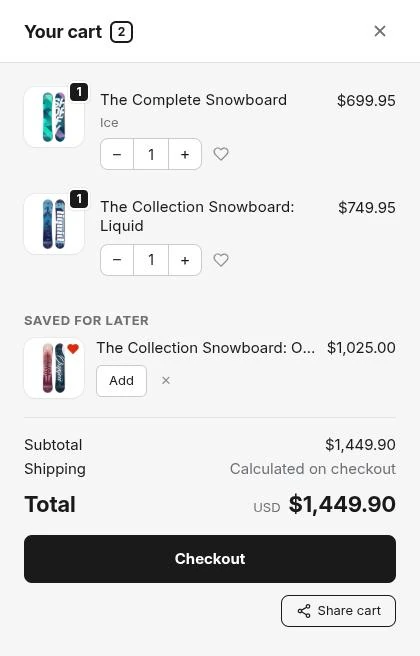
Loto Cart drawer with heart icons on items, a Saved for later list and a Share cart button 1 2
1

Wishlist

Pro

A heart on each cart item that saves it for later instead of deleting it.

How to use

Switch it on. Saved items appear under "Saved for later" in the cart on the next visit.

Why it helps

A removed item becomes a postponed sale, not a lost one.

2

Share cart

Pro

A link that opens your store with the shopper's exact cart, ready for a friend to buy.

How to use

Shoppers tap Share cart and copy the link. In the admin you see who shared, how often links were opened and which orders they brought in.

Why it helps

Word of mouth you can actually measure.

Platform & admin

Built for the people running the store

Admin in 14 languages

From English and German to Japanese and Arabic, with full right-to-left support. Switch any time from Settings.

Live preview everywhere

Every feature page has a preview rendered by the same code that runs on your store, so what you see is what ships.

Theme-editor integration

Turn the cart on in your theme with one click and see at a glance whether it's live. No code pasting.

Billing through Shopify

Plans go on your regular Shopify bill. Upgrade, downgrade or cancel from inside the app.

One lightweight script

The whole drawer loads in the background, so it never slows down how fast your pages appear.

Safe by design

Loto Cart never edits your theme code. Uninstall and your theme is exactly as it was.

Pick your features. Flip the switches.

Install Loto Cart in minutes and turn every cart open into a chance to sell more.

Free plan available7-day free trialCancel anytime